
Live stream translator
Stream in Your Language. Viewers Read Theirs.
Unitra AI turns what you say, and what you hear in game, into translated subtitles on your stream. Add them to OBS Studio as one browser source and style them your way with Overlay Studio.
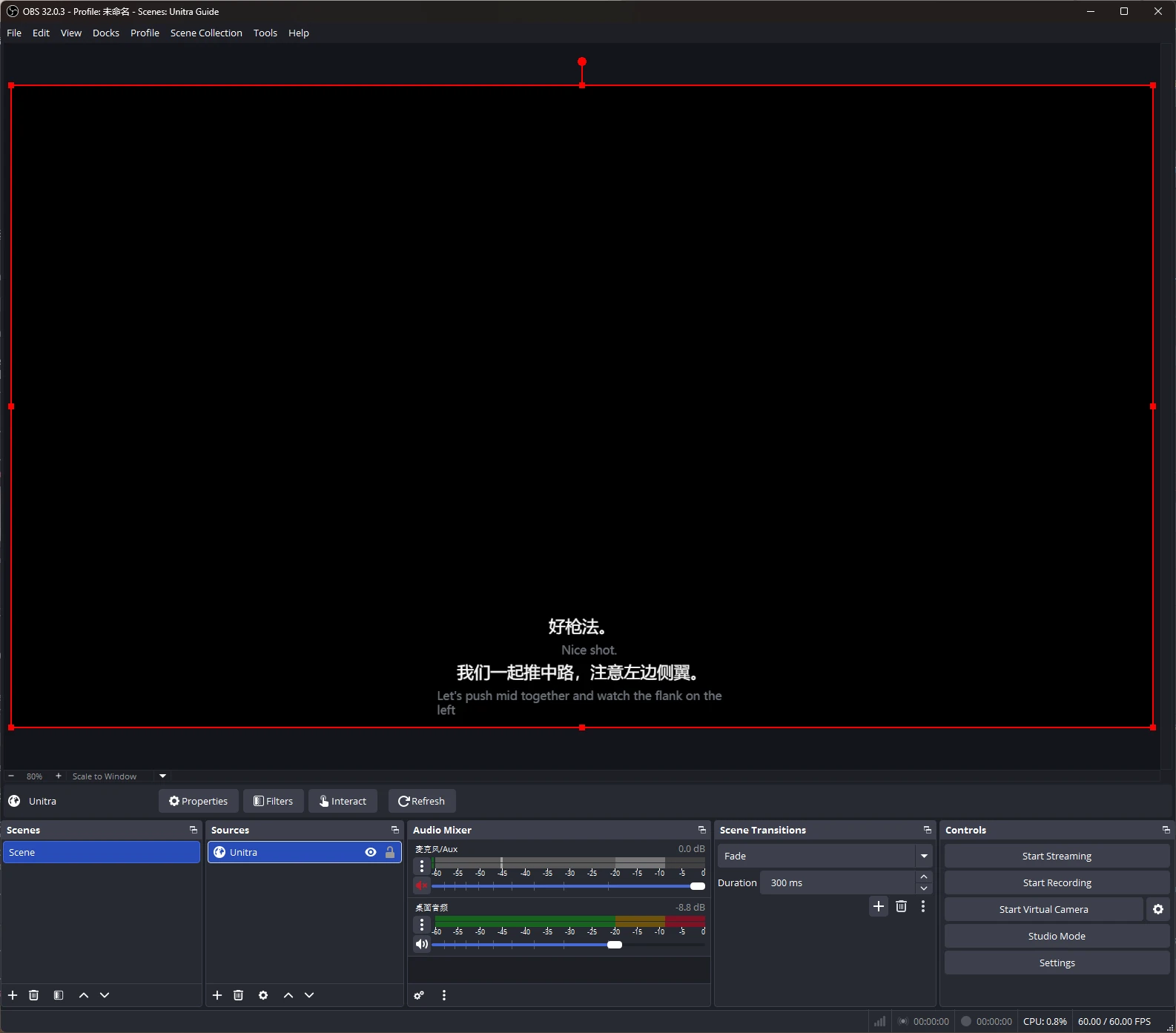
Real OBS capture from the release build.
Overview
Subtitles Your Viewers Can Actually Read
Most of your potential audience does not speak your language. Unitra AI listens to your microphone and to the game and voice chat, translates each sentence and shows it as a subtitle on your stream, about 1 to 2 seconds after it is said.
The subtitles come from a local web page that OBS shows as a browser source. There is no screen capture to set up, the source moves and scales like any other, and your own in-game overlay stays private to your screen.
Grow a Global Audience
Viewers read you in their language, with your original line under the translation if you like.
Your Voice and the Game
Subtitles cover what you say and what you hear, so viewers follow your team's voice chat too.
Styled with Overlay Studio
Fonts, outlines, colours, themes and presets, so the subtitles match your stream instead of looking bolted on.
Setup
On Stream in About 5 Minutes
Pick your languages.
In Unitra AI, choose the language you speak and the language your viewers read.
Turn on the browser overlay.
Open Settings, Overlay, switch on the browser overlay and copy the source URL. The switch and the URL stay the same after a restart.
Add a Browser Source in OBS.
In OBS Studio, add a Browser Source, paste the URL and set it to your canvas size, for example 1920 x 1080.
Start translation and go live.
Start translation in Unitra AI. Subtitles appear in the OBS preview, ready to move and scale.
At a Glance
What You Need to Know
| Details | |
|---|---|
| Plans | Champion (Legend and the Creators program included). Not part of Free or the Day Pass. |
| Software | OBS Studio 28 or later. Streamlabs Desktop and vMix work through their browser sources. |
| Platform | Windows 10/11, with OBS on the same PC as Unitra AI. |
| Timing | About 1 to 2 seconds after each sentence. |
| Display | Subtitle or chat log mode, translation only or both lines. Changes apply live, during the stream. |
| Privacy | The source URL works only on your PC and carries a private token. Keep it off stream; you can regenerate it any time. |
Overlay Studio
Make the Subtitles Part of Your Brand
Overlay Studio, included with Champion, styles every subtitle line: font, size, weight, colour and outline, with themes such as box, outline, glow, shadow and pill, an enter animation and alignment. Start from one of 8 presets or build your own.
Your style syncs with your account and can be exported and imported. The same look applies on stream, in your in-game overlay and in the Xbox Game Bar widget for fullscreen games.
FAQ
Stream Subtitle Questions, Answered
How do I add translated subtitles to my stream?
Turn on the browser overlay in Unitra AI (Settings, Overlay), copy the source URL and add it to OBS Studio as a Browser Source at your canvas size. Start translation and the subtitles appear on your stream.
Does it translate my voice or the game?
Both. Unitra AI listens to your microphone and to desktop audio, so viewers read what you say and what your teammates say in voice chat.
How fast are the subtitles?
Each subtitle appears about 1 to 2 seconds after the sentence is said.
Does it work with Twitch, YouTube and Kick?
Yes. The subtitles are part of your OBS scene, so they go out on any platform you stream to from OBS.
Does it work with Streamlabs or vMix?
Yes. Streamlabs Desktop and vMix both have browser sources; the setup is the same as in OBS.
Will viewers see my URL or my own overlay?
Your on-screen overlay is not picked up by game capture, so viewers only see the OBS source. Keep the source URL off stream because it carries a private token; if it leaks, regenerate it in Unitra AI.
Which plan includes it?
The OBS browser overlay and Overlay Studio come with Champion, and with Legend and the Creators program. They are not part of the Free plan or the Day Pass.
Can I customize how the subtitles look?
Yes. Overlay Studio sets fonts, colours, outlines, themes, animation and alignment, with 8 built-in presets, and the style syncs with your account.
Reach Viewers Beyond Your Language
Download Unitra AI for Windows, add one browser source and stream with translated subtitles.
OBS Studio is a trademark of its owners. Twitch, YouTube, Kick, Streamlabs and vMix are trademarks of their respective owners. Unitra AI is an independent tool and is not affiliated with or endorsed by the OBS Project or any streaming platform.