
Screen translator
Game Screen Translator
Translate the text a game puts on your screen, automatically as it changes: chat, menus, quests and dialogue. Part of Unitra AI, alongside real-time voice chat translation.
Windows 10/11 · Free tier included · No credit card required
macOS:Apple silicon
Overview
When the Game Is Not in Your Language
Plenty of games never get localized. A Japanese RPG with no English build, a Chinese MMO with an untranslated skill tree, a Korean survival game whose entire crafting menu is a wall of characters. The game is playable. Reading it is the problem.
A screen translator solves that by working on the pixels rather than the game files. No mod, no patch, no waiting for a publisher to fund localization, and nothing that breaks when the game updates.
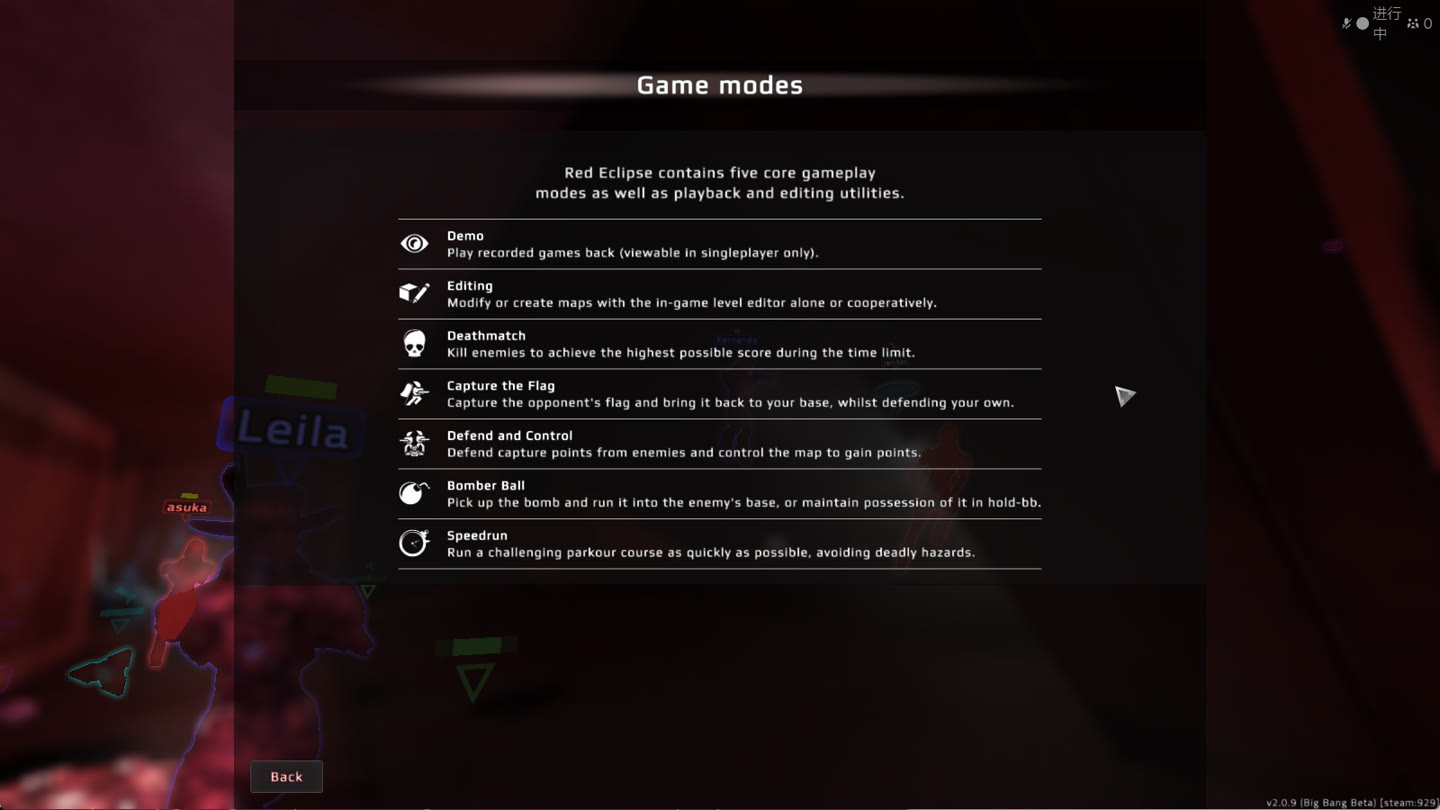
Red Eclipse help screen, English into Japanese. Real output from the release build.
Automatic, As It Changes
Choose the chat box, the subtitle line or a whole screen once. New text is read and translated into the overlay while you keep playing. Windows, with a Day Pass, Champion or Legend.
Snip or Paste a Screenshot
Drag a box around the quest log or the shop, or press Ctrl+V with a screenshot copied. The text is recognized and translated on the spot. Free on every plan.
Gaming Vocabulary
The same models used for voice, tuned on item names, skill descriptions, quest phrasing and slang that generic translators mangle.
What You Get
Automatic or On Demand, Your Choice
Here is what Unitra AI does with screen text, and which plans include it.
| Plans | What it does | |
|---|---|---|
| Automatic screen text | Day Pass, Champion, Legend Windows only | Menus, quests, subtitles and dialogue in an area you choose, translated as they change. |
| Automatic game chat (Beta) | Day Pass, Champion, Legend Windows only | Chat lines in the form "player name: message", picked up as they arrive. |
| Snip and screenshot translation | Every plan, including Free | You trigger it, one image at a time. Anything drawn on screen. |
| Typed and pasted text | Every plan, including Free | Drop chat messages, patch notes or announcements into the input box and read them in your language. |
| Voice chat translation | Every plan, including Free | Continuous. Teammate comms translated into the in-game overlay in about 1 second. |
How automatic screen translation works
Choose an area around the text, or a whole screen, and start translation. Unitra AI recognizes the text in that area on your PC as it changes and draws the translation in the same click-through overlay that already carries voice translations, or in a separate window if you prefer. One app watches both the audio and the screen, rather than an OCR tool stacked next to a voice tool, each with its own overlay, hotkeys and bill.
In a fullscreen game, press Alt+B to choose the area without leaving the game, and Alt+C to switch recognition on or off. The area is remembered for each game. Text already in your language is shown too by default; turn that off to see only text in other languages.
Setup
Start Translating in Three Steps
Install the desktop app.
Download Unitra AI for Windows 10/11. Free to start, no credit card required.
Pick your languages.
Choose the language you read and the language you want translations in.
Choose an area, or just snip.
Select the chat box or the part of the screen you cannot read and start translation, or snip a single screenshot when you need it.
Anti-Cheat
How the Screen Is Captured Matters
Screen translators are not all equally safe to run next to a competitive game. Many of them hook the graphics renderer or inject into the game process to grab frames, which is precisely the behavior anti-cheat systems are built to detect.
Unitra AI does none of that. It does not hook DirectX or OpenGL, does not inject code into the game process, does not read or write game memory, does not modify game files, and does not send keyboard or mouse input to the game. It reads the screen through the standard Windows desktop capture interface that screen recorders and streaming apps use, and the overlay is a separate window drawn on top. In exclusive fullscreen games the translations show in the free Xbox Game Bar widget instead.
One App
Screen Text Is Half the Problem
Most players who need a screen translator eventually need the other half too. You read your way through a foreign-language menu, then join a lobby and someone starts talking.
That is why screen, text and voice sit in one app and one overlay here. The main game translator page covers the voice side: microphone and desktop audio captured together, speech recognized on your device, and translations in an in-game overlay in about one second.
Languages
35 Languages
English, Chinese, Japanese, Korean, Vietnamese, French, Spanish, Portuguese, Italian, German, Russian, Dutch, Polish, Belarusian, Ukrainian, Croatian, Armenian, Georgian, Arabic and Persian and coverage continues to expand.
One honest exception on the screen side: reading text off an image needs a recognition pack for that script, and most scripts are covered. Armenian on-screen text is not readable yet, though Armenian is still available as a language to translate into.
FAQ
Screen Translation Questions, Answered
What is a game screen translator?
A game screen translator reads text that a game draws on your screen, such as menus, quest logs, item descriptions, subtitles, dialogue boxes and chat, and shows it in your language. It works on the pixels rather than on the game's files, so it needs no mod, no patch and no publisher support, and it works on games that were never localized.
Does Unitra AI translate the screen automatically while I play?
Yes, on Windows. Choose an area of the screen (or a whole screen) once, start translation, and Unitra AI reads the text in that area as it changes and shows the translation in the in-game overlay and the main window, with no further action from you. Pick Screen text for menus, quests, subtitles and dialogue, or Game chat (Beta) for chat lines in the form "player name: message". Automatic screen translation is included with Day Pass, Champion and Legend.
Can I translate a screenshot on the Free plan?
Yes. Snip a region or copy a screenshot and paste it into the app with Ctrl+V, and the text in the image is recognized and translated on the spot. Snip and paste translation is part of every plan, including Free, and works on Windows and macOS (on Mac, paste or drop the image). The Free plan does not include automatic screen translation.
Is a screen translator safe to use with anti-cheat?
It depends on how the tool captures the screen. Many screen translators hook the graphics renderer or inject into the game process to grab frames, which is exactly the behavior anti-cheat systems look for. Unitra AI does not hook DirectX or OpenGL, does not inject code, does not read or write game memory, does not modify game files and does not send input to the game. It reads the screen through the standard Windows desktop capture interface that screen recorders and streaming apps use.
Are my screen images uploaded?
No. Text recognition runs on your PC, and only the recognized text is sent for translation. Screen images stay on your device unless you choose to share samples through Help Improve Unitra, which is off by default.
Does automatic screen translation work on Mac?
Not yet. Automatic screen translation is Windows only. On macOS you can translate on-screen text by pasting or dropping a screenshot into the app, together with voice and typed chat translation.
Which languages does the screen translator support?
You can translate into the same 35 languages as the rest of the app: English, Chinese (Simplified, Traditional and Cantonese), Japanese, Korean, Vietnamese, Thai, Indonesian, Malay, Filipino, Hindi, French, Spanish, Portuguese, Italian, Romanian, German, Dutch, Swedish, Danish, Finnish, Russian, Ukrainian, Belarusian, Polish, Czech, Macedonian, Croatian, Greek, Hungarian, Turkish, Armenian, Georgian, Arabic and Persian. Reading text out of an image needs a recognition pack for that script. Most scripts are covered; Armenian on-screen text is not readable yet. Coverage continues to expand.
Do I need a separate app for voice and screen translation?
No. Voice chat translation, typed text translation, screenshot translation and automatic screen translation are all in the same Unitra AI desktop app, on one account and one overlay. Running a voice tool next to a separate OCR tool means two installs, two subscriptions and two sets of settings.
Is Unitra AI free?
Yes, free to start. The Free plan includes about 2 hours of voice translation a day, doubled when you opt in to data sharing, plus typed text and screenshot translation. Automatic screen translation comes with a Day Pass, Champion or Legend. No credit card needed to start.
Read the Game. Hear the Team.
Download Unitra AI and translate what the game shows you and what your teammates say.
Windows 10/11 · Free tier included · No credit card required
macOS:Apple silicon
All game titles and trademarks are the property of their respective owners. Unitra AI is an independent product and is not affiliated with, sponsored by, or endorsed by any game publisher.